> For the complete documentation index, see [llms.txt](https://docs.fusion.vectra.ai/llms.txt). Markdown versions of documentation pages are available by appending `.md` to page URLs; this page is available as [Markdown](https://docs.fusion.vectra.ai/cloud-onboarding/azure-cloud-onboarding/neto-onboarding-azure.md).
# Vectra Terraform Cloud Onboarding for Azure Tenants
{% hint style="info" %}
This page is a mirror from the private Github repo for Vectra Fusion's cloud onboarding automation. For direct access to this github repo or a release package of it, reach out to your Vectra contact.
{% endhint %}
## Overview
The automation can perform these functions for onboarding Azure (you may choose to use all or a subset of these automations):
1. Deploy all the infrastructure required to integrate with Fusion across multiple subscriptions and regions in an Azure tenant.
2. Add VNets configured for flow logging to Vectra Fusion as traffic sources.
3. Describe Azure resources across a Tenant and send to Vectra Fusion's context enrichment API.
4. Monitor for VNet changes and new subscriptions and trigger enabling, configuring, and onboarding to Fusion new VNets that are in scope.
The following table shows the setting that is used to enable or disable each major feature of the deployment.
### `tfvars` variables to disable features in the deployment
| Feature | `tfvars` variable | Value |
| ------------------------------------------------------- | -------------------- | ------- |
| Add/remove Fusion flow sources for VNets with flow logs | `ingest_flow` | `false` |
| Enable/disable VNet flow logging according to policy | `orchestrate_flow` | `false` |
| Context enrichment via Azure Function | `context_enrichment` | `false` |
| Execute Azure Function a schedule | `enable_schedule` | `false` |
| Trigger Azure Function via Event Grid upon changes | `eventgrid_enable` | `false` |
Note that if you disable both `enable_schedule` AND `eventgrid_enable`, the Azure Function will ONLY run when you manually trigger it. This may be ideal if you have other orchestration in place, and want to trigger the function only at specific points in your own CI/CD pipeline.
By setting each of these variables to false, you can strip down the operation of the orchestration to only use the features you need.
See the section [Least privilege custom role when disabling features](#least-privilege-custom-role-when-disabling-features) for information on how to adjust the custom role permissions when disabling features to provide the least privilege required for the Azure Function to operate.
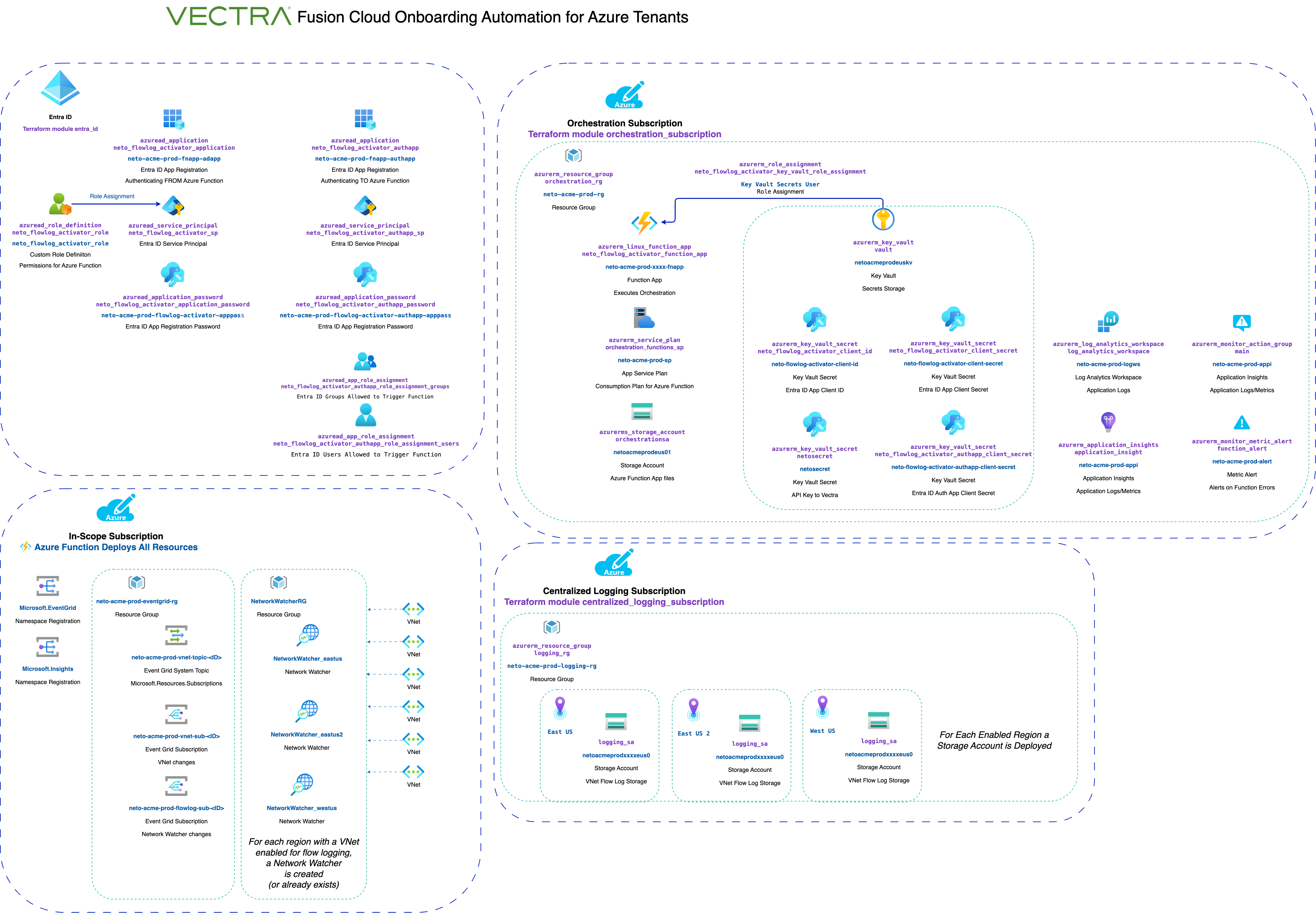
## Architecture Diagram
## Components
### Terraform deployment
* azure/terraform/deployments/neto-onboard-azure-full - Terraform to deploy the modules below; all configuration is set here.
### Terraform modules
* azure/terraform/modules/orchestration\_subscription - Deployed to a designated orchestration subscription in the Azure tenant. Creates Azure Resource Group, Storage Account, Service Plan, Application Insights, Monitor Action Group, Metric Alert, Linux Function App, Storage Container, Storage Blob, and Role Assignment for the orchestration Azure Function.
* azure/terraform/modules/centralized\_logging\_subscription - Deployed to a designated centralized logging subscription in the Azure tenant. Creates a resource group and 1 Azure storage account per region in this subscription to store flow logs for retrieval by Vectra Fusion.
* azure/terraform/modules/entra\_id - This module provisions Entra ID resources including custom roles, application registrations, service principals, and role assignments necessary for Entra ID authentication and authorization, supporting the orchestration of Azure resources.
### Azure Resource Naming
Azure resources are named based on the following convention:
* You configure `customer` and `environment` values.
* Most Azure resources are named starting with `neto-$customer-$environment-` (customer and environment can be up to 8 characters but we recommend 5 to avoid seeing it truncated in places).
* The prefix `neto` is used for all Vectra resources. Although configurable in the tfvars, some of the ancillary scripts may rely on this prefix, so do not change it.
* Storage accounts and Azure key vault have a limited character length and are named using the first 5 letters of the customer and environment and abbreviations for regions.
`neto-acme-prod` is used throughout the README as the example for the resource naming. The actual resource names are based on your customer and environment settings.
### Azure Resource Groups
* `neto-acme-prod-rg` - Resource group in the orchestration subscription that contains all orchestration resources.
* `neto-acme-prod-logging-rg` - Resource group in the centralized logging subscription that contains the storage accounts for each region.
* `neto-acme-prod-eventgrid-rg` - Resource group in the in-scope subscriptions that contains the Event Grid topic and subscriptions for triggering the Azure function.
### Azure Subscriptions
* **Orchestration subscription** `orchestration_subscription_id` - The primary deployment subscription for the terraform. Azure Functions are deployed here.
* **Centralized logging subscription** `centralized_logging_subscription_id` - Storage accounts for each region are created and flow logs are written here. This can be the same subscription as the orchestration subscription if you do not want to separate them.
* **In-scope subscriptions** - All the subscriptions in the tenant meet the scope policy, as defined in tfvars by providing a list of management groups and/or subscriptions. The root management group ID can be used to include all subscriptions in the tenant. All in-scope subscriptions are onboarded by the `neto_flowlog_activator` Azure Function App.
### Azure Function App
* `azure/functions/neto_flowlog_activator` (Azure `neto-acme-prod-HASH-fnapp`)
* Triggers:
* Schedule (if `timer_enable=true`, based on schedule set in `timer_schedule`)
* Manual trigger via API endpoint `api/run`
* Event Grid subscription to `Microsoft.Network.virtualNetworks` (when a VNet is created, updated, or deleted) and `Microsoft.Network/networkWatchers` (when a flow log configuration is changed)
* *Note: New subscriptions will be onboarded at the next scheduled run of this function. There is no way in Azure to receive a trigger for this event. If you know of a way to do this that does not itself require creating a timer-based polling mechanism (such as a log query search), let us know how.*
* Functions:
### Azure Event Grid Topic and Subscriptions
* `neto-acme-prod-vnet-topic-{ID}`: `Microsoft.Resources.Subscriptions` system topic to trigger on changes to resources in the subscription. This is deployed in each in-scope subscription by the `neto_flowlog_activator` Azure Function.
* `neto-acme-prod-vnet-sub-{ID}`: `Microsoft.Network` changes for VNet creation, update, or deletion trigger the `neto_flowlog_activator` Azure Function. This is deployed in each in-scope subscription by the `neto_flowlog_activator` Azure Function.
* `neto-flowlog-subscription-{ID}`: `Microsoft.Network/networkWatchers` changes for flow log configuration changes trigger the `neto_flowlog_activator` Azure Function. This is deployed in each in-scope subscription in the tenant by the `neto_flowlog_activator` Azure Function.
### Azure Custom Role
This custom role is created in the orchestration subscription.
* `neto_flowlog_activator_role` - Custom role used to provide least privilege required for the `neto_flowlog_activator_sp` service principal
#### `neto_flowlog_activator_role` Permissions
| Permission | Description |
| ----------------------------------------------------------- | ----------------------------------------- |
| Microsoft.Authorization/roleAssignments/delete | Delete role assignments |
| Microsoft.Authorization/roleAssignments/read | Read role assignments |
| Microsoft.Authorization/roleAssignments/write | Write role assignments |
| Microsoft.Authorization/roleDefinitions/read | Read role definitions |
| Microsoft.Authorization/roleDefinitions/write | Write role definitions |
| Microsoft.Compute/virtualMachines/read | Read virtual machines |
| Microsoft.EventGrid/register/action | Register the Microsoft.EventGrid provider |
| Microsoft.EventGrid/eventSubscriptions/read | Read event grid event subscriptions |
| Microsoft.EventGrid/eventSubscriptions/write | Write event grid event subscriptions |
| Microsoft.EventGrid/extensionTopics/\* | Read/write event grid extension topics |
| Microsoft.EventGrid/systemTopics/eventSubscriptions/read | Read system topics event subscriptions |
| Microsoft.EventGrid/systemTopics/eventSubscriptions/write | Write system topics event subscriptions |
| Microsoft.EventGrid/systemTopics/read | Read event grid system topics |
| Microsoft.EventGrid/systemTopics/write | Write event grid system topics |
| Microsoft.EventGrid/topics/read | Read eventgrid topics |
| Microsoft.Insights/Register/Action | Register the Microsoft.Insights provider |
| Microsoft.Network/networkInterfaces/read | Read network interfaces |
| Microsoft.Network/networkWatchers/configureFlowLog/action | Configure flow log resources |
| Microsoft.Network/networkWatchers/flowLogs/delete | Delete flow log resources |
| Microsoft.Network/networkWatchers/flowLogs/read | Read flow log resources |
| Microsoft.Network/networkWatchers/flowLogs/write | Write flow log resources |
| Microsoft.Network/networkWatchers/queryFlowLogStatus/action | Query status of flow logs |
| Microsoft.Network/networkWatchers/read | Read network watchers |
| Microsoft.Network/networkWatchers/write | Write network watchers |
| Microsoft.Network/publicIPAddresses/read | Read public IP addresses |
| Microsoft.Network/virtualNetworks/read | Read virtual networks |
| Microsoft.Network/virtualNetworks/write | Write virtual networks |
| Microsoft.Resources/subscriptions/resourceGroups/read | Read resource groups |
| Microsoft.Resources/subscriptions/resourceGroups/write | Write resource groups |
| Microsoft.Resources/subscriptions/resources/read | Read subscriptions |
| Microsoft.Storage/storageAccounts/listkeys/action | List storage account keys |
| Microsoft.Storage/storageAccounts/read | Read storage accounts |
| Microsoft.Web/sites/Read | Read Azure Functions |
| Microsoft.Web/sites/functions/write | Write Azure Functions |
| Microsoft.Web/sites/functions/read | Read Azure Functions |
| Microsoft.managementGroups/descendants/read | Read management group descendants |
| Microsoft.managementGroups/read | Read management groups |
### Azure Application Registration
* `neto_flowlog_activator_application` (Azure `neto-acme-prod-HASH-fnapp-adapp`) - Registers an application for the `neto_flowlog_activator` Azure Function App
* `neto_flowlog_activator_authapp` (Azure `neto-acme-prod-HASH-fnapp-authapp`) - *(Only if `function_entra_auth=true`)* Provides Entra ID authentication for users to interact with the `neto_flowlog_activator` Azure Function App HTTP API endpoints
### Azure Service Principal
* `neto_flowlog_activator_sp` (Azure `neto-acme-prod-HASH-fnapp-adapp`) - Identity the `neto_flowlog_activator` Azure Function runs as
* `neto_flowlog_activator_authapp_sp` (Azure `neto-acme-prod-HASH-fnapp-authapp`) - *(Only if `function_entra_auth=true`)* Provides Entra ID authentication for users to interact with the `neto_flowlog_activator` Azure Function App HTTP API endpoints if
#### Azure Application Keys
The Azure Applications have a random key generated for it which is set in Key Vault, and read by the Azure Function to execute with its service principal identity and authenticate the application for Entra ID authentication.
* `neto_flowlog_activator_application_password` (Azure `neto-acme-prod-flowlog-activator-apppass`) - Application client secret for the `neto_flowlog_activator` Azure Function identity to access Azure resources
* `neto_flowlog_activator_application_password` (Azure `neto-acme-prod-flowlog-activator-authapp-pass`) - *(Only if `function_entra_auth=true`)* Application client secret for the `neto_flowlog_activator` to authenticate the application for Entra ID authentication of users interacting with the Azure Function App HTTP API endpoints
### Azure Key Vault
* `neto_keyvault` (Azure `netoacmeprodkv`) - Key vault created in the orchestration subscription.
#### Key Vault Secrets
* Azure application secrets for the Azure function to run as the service principal with the custom role privileges
* `neto-flowlog-activator-client-id` - Stores the client ID for the `neto_flowlog_activator` Azure Function
* `neto-flowlog-activator-client-secret` - Stores the client secret for the `neto_flowlog_activator` Azure Function
* `neto-flowlog-activator-authapp-client-secret` - *(Only if `function_entra_auth=true`)* Stores the client secret for Entra ID authentication app registration
* Vectra Fusion API key secrets
* `netosecret` - Stores the Vectra Fusion API netosecret, used to authenticate with the Vectra Fusion API.
## Prerequisites
### 1. Required Permissions
* **Global Administrator** access to the *Azure Tenant*.
* **Key Vault Administrator** access to the *Orchestration Subscription*. This is not included in **Global Administrator**.
* **Role Based Access Control Administrator** access to the *Root Tenant Management Group*. This is not included in **Global Administrator**.
*\*It may take up to 10 minutes for permissions to propagate to subscriptions in Azure. If you see permission errors when deploying, wait a few minutes and try again.*
### 2. No Azure Policy restrictions
No Azure Policy should exist that would restrict the automation from creating or using the resources described below, including role assignments and region usage. If you receive a `RequestDisallowedByPolicy` error when deploying the automation or when the Azure Function executes, you will need an Azure [Resource Policy Contributor](https://learn.microsoft.com/en-us/azure/role-based-access-control/built-in-roles/management-and-governance#resource-policy-contributor) to identify the policy rule and create an exemption. See: [Resolve errors for request disallowed by policy](https://learn.microsoft.com/en-us/azure/azure-resource-manager/troubleshooting/error-policy-requestdisallowedbypolicy?tabs=azure-cli).
### 3. Vectra Fusion API Key
Create a Vectra Fusion API key. See: [API Keys](/settings/user-management/index.md#user-management---api-keys)
Set the terraform variable `netosecret` to this key. It is more secure to pass this key from the environment rather than storing it in your tfvars file.
e.g. Store and export it into the environment variable `NETOSECRET` (`export NETOSECRET=$(pbpaste)` on MacOS will copy it from clipboard), then run terraform apply with argument `-var="netosecret=$NETOSECRET"`
### 4. Vectra Fusion CLI tool *(Optional)*
It is helpful to use the neto CLI tool as part of deploying to validate its operation. This package is in the repo `/neto/` directory.
See ../neto/README.md for more details
To install this into a Python virtual environment (recommended - this will ensure you don't have any conflicts, and allows you to run `neto` whenever you have activated this environment):\
From the root of repo directory `neto-onboarding/`, run:
```sh
python3 -m venv venv
source venv/bin/activate
cd neto
pip install .
neto --version
neto -h
```
### 5. Basic Terraform Knowledge
This automation has been built for engineers with basic familiarity using terraform.
## Azure Region Handling
The default settings apply the automation to all commercial regions.
To create Azure Storage Accounts in specific regions, edit the Terraform `logging_regions` variable. If you are using any regions that require special Azure support enablement or government regions, you need to update that variable.
* If a VNet flow log is in-scope for flow logging, but it is in a region that no storage account was created for, it will cause an error noting the VNet that could not be configured for flow logs and the region that is missing a storage account.
### New Region Handling
* The `logging_regions` variable default value contains all commercially available default regions as of the most recent release.
* Vectra will release updates to the automation with new Azure regions added to the `logging_regions` default value.
* Using the updated default value and run `terraform apply` to add support for new regions.
* You can also manually add a new region by adding it to the variable in your tfvars file.
## Understanding Scope in Azure
### Custom role assignable scope and service principal role assignment scope
The *Assignable Scope* for a custom role limits the ability to assign the custom role to only resources contained within the assignable scope. It is a maximum limit and does not convey any privileges to the assignable scope. The terraform creates the custom roles with an assignable scope of the *Tenant Root Group* management group, allowing them to be assigned to any management groups and subscriptions in the Azure Tenant.
If you are deploying to only a single management group below the Tenant Root Group in an Azure tenant AND want to restrict permissions so that the deployment has no permissions beyond that management group, you can set `custom_roles_assignable_scope` and `scope_root_management_group` to the management group ID. If you are configuring the deployment to only orchestrate within a single management group initially, but may expand that scope in the future, it is simpler to leave the default values for this and use the scope policy to limit the scope instead.
See: \
See:
## Understanding Scope for the Orchestration
### Scope Policy
The scope policy determines whether a subscription is in-scope for orchestration. The scope policy is defined in JSON, containing a list of rules. To make every subscription in your Azure tenant in scope, add the root tenant management group ID as a member of a single policy rule.
A rule has these values:
Each rule has a **type** (management\_group or subscription), **action** (include or exclude), **members** (list of IDs), an optional **subpolicy** section for VNet rules, and an optional **config** section for configuration parameters.
```json
{
"policy": [
{
"type": "management_group",
"action": "include",
"members": [
"MG_ID_1"
],
"config": {
"sample_rate": 5
}
},
{
"type": "subscription",
"action": "include",
"members": [
"MY_SUB_ID_1", "MY_SUB_ID_2"
],
"config": {
"sample_rate": 3
},
"subpolicy": [
{
"type": "vnet",
"members": ["my-vnet1", "my-vnet2"],
"config": {
"sample_rate": 10
},
{
"type": "vnet",
"members": ["my-vnet3", "my-vnet4"],
"config": {
"enable": false
}
}
]
}
]
}
```
Policy rules are always inherited, with the most closely scoped rule to the subscription having precedence (eg subscription rules take precedence over a parent management group rule which takes precedence over a root tenant management group level.
#### Valid `members` values
* The ID of the management group, subscription in a rule, and ID of vnet in a subpolicy rule.
#### Policy config
You can modify flow log settings for each policy rule by adding a **config** section to the rule. If a config section is present, any values set take precedence over values set in tfvars. A config section in an `"action":"exclude"` rule will apply those settings when offboarding a project due to it no longer being in scope (if the project was never onboarded, the settings will never be used).
Within a config section, the supported keys are:
* `ignore` - If set to true, no flow log configuration will be modified. Use where another system is orchestrating flow log configurations to avoid conflicts.
* `sample_rate` - Value passed to the Vectra Fusion flow source configuration
`scope-policy.json.template-simple` provides a template for a simple policy.\
`scope-policy.json.template-complex` provides a template for a more complex policy.
Copy one to `scopy-policy.json` and edit.
### Setting users and groups authorized to the HTTP endpoint
*(Only applies if `function_entra_auth=true`)*
Only users and groups set in tfvars `function_entra_auth_assigned_users` and/or `function_entra_auth_assigned_groups` can use the HTTP endpoints to trigger the function.
* `scripts/allowed-users` - This script will convert user principal names (UPNs) in format user\@domain to Azure Object IDs and output the terraform variable function\_entra\_auth\_assigned\_users with the values. Run with no arguments to see usage.
* `scripts/allowed-groups` - This script converts Azure group display names to their corresponding Object IDs and output the terraform variable function\_entra\_auth\_assigned\_groups with the values. Run with no arguments to see usage.
See the section below [Authentication and Authorization for the Azure Function HTTP endpoints](#authentication-and-authorization-for-the-azure-function-http-endpoints) for more information on authentication configuration options.
## Deployment Steps
*\*It may take up to 10 minutes for permissions to propagate to subscriptions in Azure. If you see permission errors when deploying, wait a few minutes and try again before troubleshooting further.*
> **bootstrap script**\
> The `bootstrap` script is a quick-start convenience tool designed to guide you through deploying the Vectra onboarding automation for Azure on a fresh Ubuntu 22.04 VM. It installs required dependencies, clones the GitHub repository, prompts for authentication details, deploys and runs the Terraform automation, and validates its operation. While not mandatory, it provides a streamlined way to get started and understand the setup process. For other operating systems, you may need to adapt or manually perform the initial setup steps.
>
> To use the script, download it from the following link and execute it on your VM. The script assumes you have not yet cloned the repository:\
> Netography Azure Bootstrap Script
{% stepper %}
{% step %}
## Deploying the `neto-onboard-azure-full` Terraform automation
* This terraform project is targeted towards a designated orchestration subscription in your Azure tenant. Ensure that you are in the right subscription by running `az account show` and verify the subscription ID. If the subscription is not the one you want to deploy to, run `az account set --subscription ` to set the correct subscription.
* From the root directory of this repository: `cd azure/terraform/deployments/neto-onboard-azure-full`
* Change the backend.tf file to the backend your organization uses
* Copy terraform.tfvars.template to terraform.tfvars and define the appropriate variables.
* Run `terraform init`
* Run `terraform apply` and accept the changes (`terraform apply -var="netosecret=$NETOSECRET"` if you are passing API key from environment variable)
*(If you prefer, you can use a dummy value (e.g. `REPLACEME`) in Terraform and then update the secret manually in Azure Key Vault after the deployment.)*
The input variables and resources created are described in `terraform/deployments/neto-onboard-azure-full/README.md`
After completing the terraform apply, verify all the resources were deployed successfully.
{% endstep %}
{% step %}
## Run the Azure Function
The Terraform deploys resources, but the Azure Function does most of the work. The Azure Function will not execute until you manually trigger it or it runs on a schedule.
You can trigger the Azure Function to run in one of these ways:
1. `scripts/run` - This script uses the `az` CLI and curl to trigger the Azure function.
2. Run a "Neto Azure: Run Function" task in VS Code - This will execute `scripts/run` with the appropriate arguments
3. Manually trigger the function in the Azure portal
### Onboarding in a large-scale Azure tenant
This orchestration has been deployed and tested in Azure tenants with dozens of subscriptions and thousands of VNets. If you have a relatively large Azure tenant or have mission-critical production operations running, it is good CloudOps practice to onboard in steps to validate the operation of any orchestration like this rather than in a single run. Some tips for a large deployment:
1. If you have an Azure tenant for development, staging, or testing, onboard to that tenant first to validate the operation in your environment and become familiar with its usage. If you don't have easy access to this yourself, reach out to Vectra as we can do a deployment with you in one of our isolated Azure tenants we use for training and testing.
2. Onboard in batches of subscriptions, starting with an initial small set in the scope policy, operating first on less business critical subscriptions, ensure that everything completes successfully, and then add additional subscriptions to the scope policy, redeploy, and trigger the function again. If you have logical groupings of subscriptions in management groups, adding management groups to the scope policy is a good approach for this.
3. Trigger the function when first onboarding a new set of subscriptions with `scripts/run -v onboard` to onboard the subscription without enabling flow logs, verify it completes successfully, then run `scripts/run -v all` to perform the flow logging orchestration and context enrichment in the second step.
4. Set `timer_schedule=false` in tfvars to disable the scheduled execution of the function until you complete the onboarding process.
### Running the Azure Function with the `scripts/run` script
If `function_entra_auth=false`, your logged in user with the `az` command must have permission to read the Function App function key to trigger the function with the run script.\
If `function_entra_auth=true`, your logged in use with the `az` command must have its identity specified in the list of authorized users in the Terraform configuration to trigger the function with the run script. See: [Setting users and groups allowed to authenticate to the HTTP endpoints](#setting-users-and-groups-authorized-to-the-http-endpoints).
```sh
Usage: ./run [options] -- [az options]
Triggers the Azure Function to run with the specified command.
Commands:
all Full function run (onboarding, orchestration, context enrichment, and offboarding)
onboard, 1 Onboard new subscriptions and offboard out-of-scope subscriptions only
orchestrate, 2 Onboarding, orchestration, and offboarding
context, 3 Context enrichment only
offboard Offboarding of out-of-scope subscriptions only
destroy Destroy all resources created by the function (complete offboarding first)
show Display the function details (does not trigger the function)
Options:
-s, --subscription ID Target the single subscription ID provided as argument.
--nowait Do not wait for function completion; trigger and exit
-l, --local Set if you are running the Azure Function locally for debugging (see azure/DEVELOPING.md)
-v, --verbose Enable verbose output
-h, --help Show this help message
-- [az options] Additional options to pass to the az CLI. eg: ./run all -- --debug
```
### Running the Azure Function in VS Code
Open the repository in VS Code, and then Open Command Palette (**F1** / **Cmd+Shift+P**) → **Tasks: Run Task** → **Neto Azure: Run Function (all)**
Note: The tasks marked with *(LOCALLY)* are for local development and debugging, and require additional setup to use. See `azure/DEVELOPING.md` for more information.
### Manually Triggering the Azure Function in the Azure Portal
1. In the Azure portal, navigate to the new function app deployed to the orchestration subscription at:
2. Select Functions, and choose `run` from the list of functions.
3. Wait for the Logs window at bottom of screen to say "Connected!" before proceeding in order to see the logs in real-time.
4. Click `Test/Run`. You can leave everything on this page blank.
5. Click `Run`. This will trigger the function to run.
6. Review the logs for any errors before navigating away from this page.
If you see permission errors in the logs, the permissions assigned may not have yet propagated within Azure, and simply re-running the function may resolve the issue. Wait a few minutes, and then repeat the steps to manually trigger the Azure function. If an Azure API call creating a resource fails with an error such as Internal Server Error, these are usually transient Azure issues and will succeed during the next function run. If you see a consistent error on a resource when re-running the function, escalate this to Vectra for assistance.
{% endstep %}
{% step %}
## Review the Azure Function logs
When using the `scripts/run` script, logs are output to the terminal along with a human readable status output. However, if the function takes over 230 seconds to complete (the maximum timeout for Azure HTTP endpoints), you will receive an 502 HTTP error from Azure and the logs and status will not be directly visible. In this case, you should use the `scripts/log` script to retrieve the logs from the Azure Function App, and run the function again if needed.
*It can take up to 5 minutes after the function runs to retrieve logs in Azure. If you attempt to retrieve logs and they are missing, wait a couple of minutes and try again.*
### Retrieving and viewing logs from CLI `scripts/log`
`scripts/log` retrieves the logs from the Azure Function App, parses them, and opens a viewer.
```sh
Usage: ./log [options] -- [az monitor log-analytics query options]
Collect logs from Azure using a local-clock relative window.
Options:
-n MINUTES Shortcut for --after MINUTESm --before 0m
--after DURATION Start offset from now (e.g. 2h15m means "from 2h15m ago")
--before DURATION End offset from now (e.g. 30m means "until 30m ago", default: 0m)
-o OUTPUT_FILE Specify output file name (default: neto-azure-TIMESTAMP.log)
-s Save logs but do not view output (default: saves + views)
-f Pretty text format for logs (default, uses logparser.py)
-t Unparsed text format (TSV)
-j JSON format
-c Enable color output (only applies with -f)
-k KEYWORDS Highlight specified keywords (implies -f and -c)
-e Show only ERROR logs
-w Show WARNING and ERROR logs
-v Enable verbose (debug) output
-h Show this help message
-- [az options] Additional arguments to pass to az monitor log-analytics query
Environment Variables:
NETO_FORMAT Default output format: pretty, json, or text.
NETO_COLOR Set to 'True' to enable color output by default.
NETO_THEME Color theme for parsed logs (default: basic).
NETO_KEYWORD Additional keywords to highlight (comma-separated).
Examples:
./log --after 2h15m --before 30m -c
./log -n 60 -c
./log -t -s # output logs in TSV format, save file but don't view
```
### Retrieving and viewing logs in VS Code
* Install VS Code Extension [ANSI Colors](https://marketplace.visualstudio.com/items?itemName=iliazeus.vscode-ansi) for viewing parsed logs in color: `code --install-extension iliazeus.vscode-ansi`
* VS Code: Open Command Palette (**F1** / **Cmd+Shift+P**) → **Tasks: Run Task** → **Neto Azure: Logs Last 15 Minutes (color)**
* There are additional **Neto Azure: Logs** tasks to choose from.
* If you see ANSI codes in a log: Open Command Palette (**F1** / **Cmd+Shift+P**) → **ANSI Text: Open Preview**
* The task will run the `scripts/log` script and then open the ANSI Colors Preview for the parsed log output in VS Code.
### Viewing logs in the Azure Portal
* Azure Portal - Function App:
1. In the Azure portal, navigate to the function app deployed to the orchestration subscription.
2. You can view real-time logs as the function executions by selecting `Log Stream` from the `Monitoring` section of the left-hand menu (or it may appear at top of the menu; click the star to add it to your Favorites)
3. You can view historical run logs by selecting Functions and then select `run`, and then go to the `Invocations` tab.
4. It may take up to 5 minutes for invocation logs to appear after a function executes.
* Azure Portal - Application Insights:
1. Go to Application Insights in the Azure portal, select the `neto-acme-prod-appi` resource
2. Click Logs (button at top or under Monitoring in the menu on left)
3. On right-side of query box, change drop-down from Simple mode to KQL mode.
4. In the query box enter: traces
5. Click Run button
{% endstep %}
{% endstepper %}
## Offboarding Management Group(s) or Subscription(s)
Edit your `scope-policy.json` and then `terraform apply` to modify your policy.
## Destroy (complete offboarding) the entire orchestration
You must disable the function from executing commands before running the destroy in order to prevent it from re-onboarding resources through a trigger or scheduled event during the destroy process. This is done by setting the `DESTROY` environment variable in the Function App configuration to `true`.
1. Run `scripts/update set-destroy` to set the `DESTROY` environment variable in the Azure Function App. (`scripts/update clear-destroy` will reverse this and delete it, re-enabling the function).
2. Run `scripts/run destroy` to offboard all subscriptions. Review the logs (`scripts/log`) to ensure it completed successfully, and ensure all subscriptions are offboarded (`scripts/tag -a list`).
3. Run `terraform destroy` to remove all resources created by the automation.
## Authentication and Authorization for the Azure Function HTTP endpoints
The main work of the orchestration is performed by an Azure Function App. An API endpoint is exposed by the Function App to allow manual triggering of the function. This API endpoint is secured by the Azure Function App function key (if `function_entra_auth=false`) and by an Entra ID authentication app registration (if `function_entra_auth=true`).
See the section above on [Setting users and groups allowed to authenticate to the HTTP endpoints](#setting-users-and-groups-authorized-to-the-http-endpoints) for more information on how to set users and groups authorized to use the HTTP endpoints.
### Authentication security configuration
1. HTTPS is required for all endpoints.
2. The function logs to Application Insights.
3. The `scripts/run` command uses Azure authentication through the `az` CLI to retrieve the details and authentication required to trigger the function.
If `function_entra_auth=false`:
* The function key created by Azure with the Function App can be used to trigger the function. This is retrieved by the `scripts/run` script using your user authentication credentials that have access to read this from the Function App, and is passed in the HTTP request header.
If `function_entra_auth=true`:
* You must explicitly set the users and groups authorized to use the HTTP endpoints (unless you explicitly disable this in tfvars).
* You are authenticated through Entra ID identities.
* You must have an identity in the tenant where the function app is deployed.
* You must log in to this identity using the az CLI (eg az login).
* You can not access the HTTP access with only a static function or master key to the function app.
* Azure App Service built-in authentication and authorization capabilities are used.
* The Entra ID app registration secret is stored in Azure Key Vault and accessed by the Function App through a system managed identity.
### Additional security hardening options
In addition to the default configuration, you can further harden the Azure Function by configuring the following options in your `terraform.tfvars` file.
1. Restrict the IP addresses that can access the function by setting the `function_ip_restriction` variable to `Deny` and providing a list of IP addresses in the `function_allowed_ips` variable. By default, any IP address can access the function (authentication is still required). Setting this to `Deny` conflicts with the `eventgrid_enable=true` setting, unless you add all Event Grid source IP addresses published by Azure to this IP list. Microsoft updates this list on a weekly basis, so this is not a practically supportable configuration. A refactored design of the Event Grid trigger will resolve this conflict in a future release without requiring this work.
2. Restrict the IP addresses that can deploy code to the Function App by setting the `function_scm_ip_restriction` variable to `Deny` and providing a list of IP addresses in the `function_scm_allowed_ips` variable. By default, any IP address (with authentication credentials) can deploy to an Azure Function App. The deployment itself is handled by Terraform, so setting this restriction will restrict what IPs can do an updated deployment to your existing Function App.
There are a myriad of available options in Azure for further restricting access to HTTP endpoints, including configuring different authentication providers, allowing users in other tenants to authenticate (which may be useful if you have multiple Azure tenants), Azure API management (APIM), Azure Private Endpoint, Azure Application Gateway, Azure Front Door, and more. Most of these options should be largely compatible with the Azure Function deployment if you choose to implement these yourself. You may need to manually adjust `scripts/run` or provide your own command instructions to trigger a function based on any additional hardening you implement.
### Using Entra ID authentication for the HTTP endpoint
* Enable Entra ID authentication by setting `function_entra_auth=true`. Currently, this authentication is not supported when using Event Grid triggers, so you have to choose between either enabling Event Grid or Entra ID authentication. This conflict will be resolved in an update to the orchestration in an upcoming release.
* You can allow ANY authenticated user in a tenant to use the HTTP endpoint by setting `function_entra_auth_assignment_required=false`. This is not recommended for production environments.
### Azure CLI Commands for Entra ID
These scripts are to guide you with az CLI commands if you must manually create these resources instead of using the Entra ID module included in the terraform.
Carefully read this documentation and the script before using. This should only be used if absolutely required, as it introduces multiple additional steps and opportunities for permissions to be mismatched between these settings and those managed by Terraform. To use,
* Before deploying the terraform, run the `entraid-az-commands-create.sh` script to create the necessary resources. The script will prompt you for the necessary values (press enter to use the default values). Once the script completes, copy the output values to the `terraform.tfvars` file.
* Deploy the terraform as described above.
* Once the terraform is deployed, manually add the outputted key vault secrets to the key vault in the orchestration subscription. These values are outputted after running the `entraid-az-commands-create` script, so it is advised to use two terminal windows, one for the script and one for the terraform output.
* On teardown, first run the `offboard` trigger in the Azure Function to disable flow logs and remove flow sources for all VNets. Then run the `entraid-az-commands-remove.sh` script to remove the resources created by the `entraid-az-commands-create.sh` script. Finally, run `terraform destroy` to remove all Terraform-created resources.
* `scripts/entraid-az-commands-create.sh`
* `scripts/entraid-az-commands-remove.sh`
### Least privilege custom role when disabling features
The custom role `neto_flowlog_activator_role` is deployed with privileges to execute all features of the deployment. If you disable features and will not use them in the future, you may want to edit the custom role to remove those permissions entirely in order to provide the least privilege required for the Azure Function to operate.
The custom role permissions are defined in `azure/terraform/modules/entra_id/custom_roles.tf`. The permissions that can be removed when disabling a feature are listed below:
* `ingest_flow=false` - No changes (this only affects API calls to the Vectra Fusion API)
* `orchestrate_flow=false` - `Microsoft.Network/networkWatchers/flowLogs/write`, `Microsoft.Network/networkWatchers/flowLogs/delete`, `Microsoft.Network/networkWatchers/configureFlowLog/action`, `Microsoft.Network/networkWatchers/queryFlowLogStatus/action`, `Microsoft.Network/networkWatchers/write`, `Microsoft.Network/virtualNetworks/write`
* `context_enrichment=false` - `Microsoft.Compute/virtualMachines/read`, `Microsoft.Network/networkInterfaces/read`, `Microsoft.Network/publicIPAddresses/read`, `Microsoft.Network/virtualNetworks/read`
* `eventgrid_enable=false` - `Microsoft.EventGrid/*`
## Additional Notes
If you re-apply the terraform, be sure to grant yourself `Key Vault Administrator` access to the orchestration subscription's key vault. This is not included in the `Global Administrator` role. This allows terraform to check if you updated the key vault secrets and update the Azure Functions with the new secrets.
---
# Agent Instructions
This documentation is published with GitBook. GitBook is the documentation platform designed so that both humans and AI agents can read, navigate, and reason over technical content effectively. Learn more at gitbook.com.
## Querying This Documentation
If you need additional information that is not directly available in this page, you can query the documentation by asking a question.
Perform an HTTP GET request on the following URL with the `ask` and `goal` query parameters:
```
GET https://docs.fusion.vectra.ai/cloud-onboarding/azure-cloud-onboarding/neto-onboarding-azure.md?ask=&goal=
```
`ask` is the immediate question: it should be specific, self-contained, and written in natural language.
`goal` is what the user is ultimately trying to achieve, the reason they need the answer. Sharing it helps GitBook give you a better, more relevant answer. A goal is most helpful when it describes the outcome the user wants rather than restating the question. For example, with `ask=how do I create an API token`, a goal like `automate deployments from our CI pipeline` lets GitBook tailor the answer to that use case.
The response will contain a direct answer to the question and relevant excerpts and sources from the documentation.
Use this mechanism when the answer is not explicitly present in the current page, you need clarification or additional context, or you want to retrieve related documentation sections.