# December 19, 2023
Our end-of-the-year update includes two new great features that give you more flexibility in integrating new sources of asset context and makes the user interface more intuitive.
## Enhancements
### NetoFuse Modules Available in SaaS
[NetoFuse](https://docs.netography.com/docs/netofuse) is software that provides enriched asset context to Netography Fusion from 3rd party products. [Previously](https://docs.netography.com/netography-docs/changelog/release-notes-11212023), we released NetoFuse for on-prem deployments using a container or Python package, but you had to contact Netography Support to deploy NetoFuse modules in the Netography Fusion SaaS. We've added the ability to configure NetoFuse modules in the portal directly as [Context Integrations](https://docs.netography.com/docs/integrations) that run in the cloud.
The NetoFuse modules now available to configure in the portal are:
| Vendor | Product(s) | Context Integration |
| --------- | ------------------------------------------------------- | --------------------------------------------------------------------------------- |
| Axonius | Axonius Platform | [Axonius](doc:axonius:context) |
| Claroty |
| [Microsoft Defender](https://docs.netography.com/docs/microsoft-defender-context) |
| RunZero | RunZero | [RunZero](https://docs.netography.com/docs/runzero-context) |
| Tenable | Tenable Vulnerability Management | [Tenable](https://docs.netography.com/docs/tenable-context) |
### Global Filter Redesign
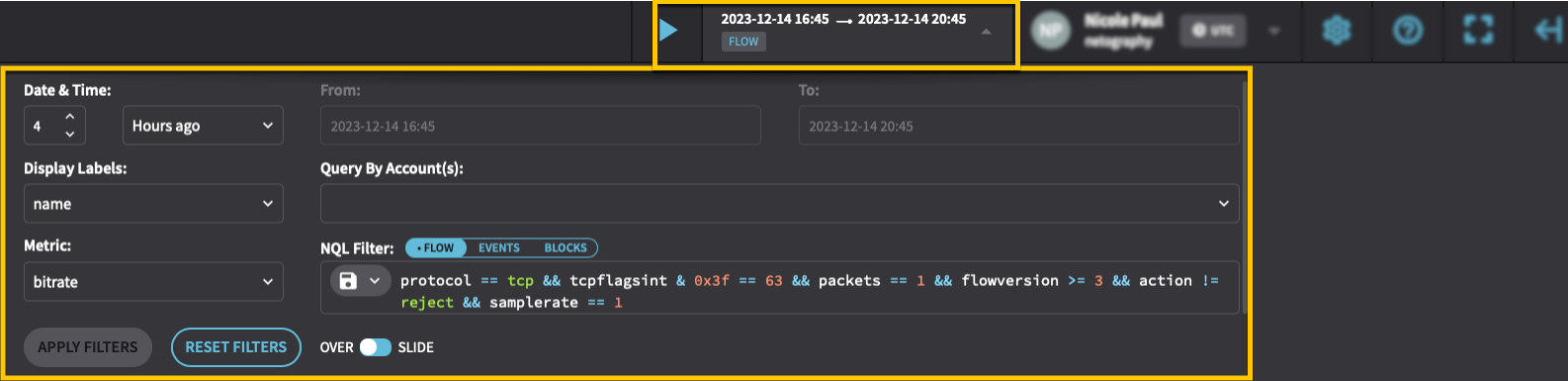
The Global Filter defines the time period and filters for the data displayed in the portal. Global filters can be inherited or overridden in user-created dashboards. The new "sticky" design of the Global Filter displays information at a glance with a clear visual connection to the page title it refers to.
The behavior of global filters has not changed - only the user interface. Here are a few tips for using the new interface:
Switches between Flow, Events, and Block filters.
Expands the Global Filter with additional options.
Save a filter or Load a saved filter
#### Before
#### After
---
# Agent Instructions: Querying This Documentation
If you need additional information that is not directly available in this page, you can query the documentation dynamically by asking a question.
Perform an HTTP GET request on the current page URL with the `ask` query parameter:
```
GET https://docs.fusion.vectra.ai/release-notes/2023/december-19-2023.md?ask=
```
The question should be specific, self-contained, and written in natural language.
The response will contain a direct answer to the question and relevant excerpts and sources from the documentation.
Use this mechanism when the answer is not explicitly present in the current page, you need clarification or additional context, or you want to retrieve related documentation sections.