# January 16, 2024
Netography kicks off 2024 with a few new enhancements.
## Enhancements
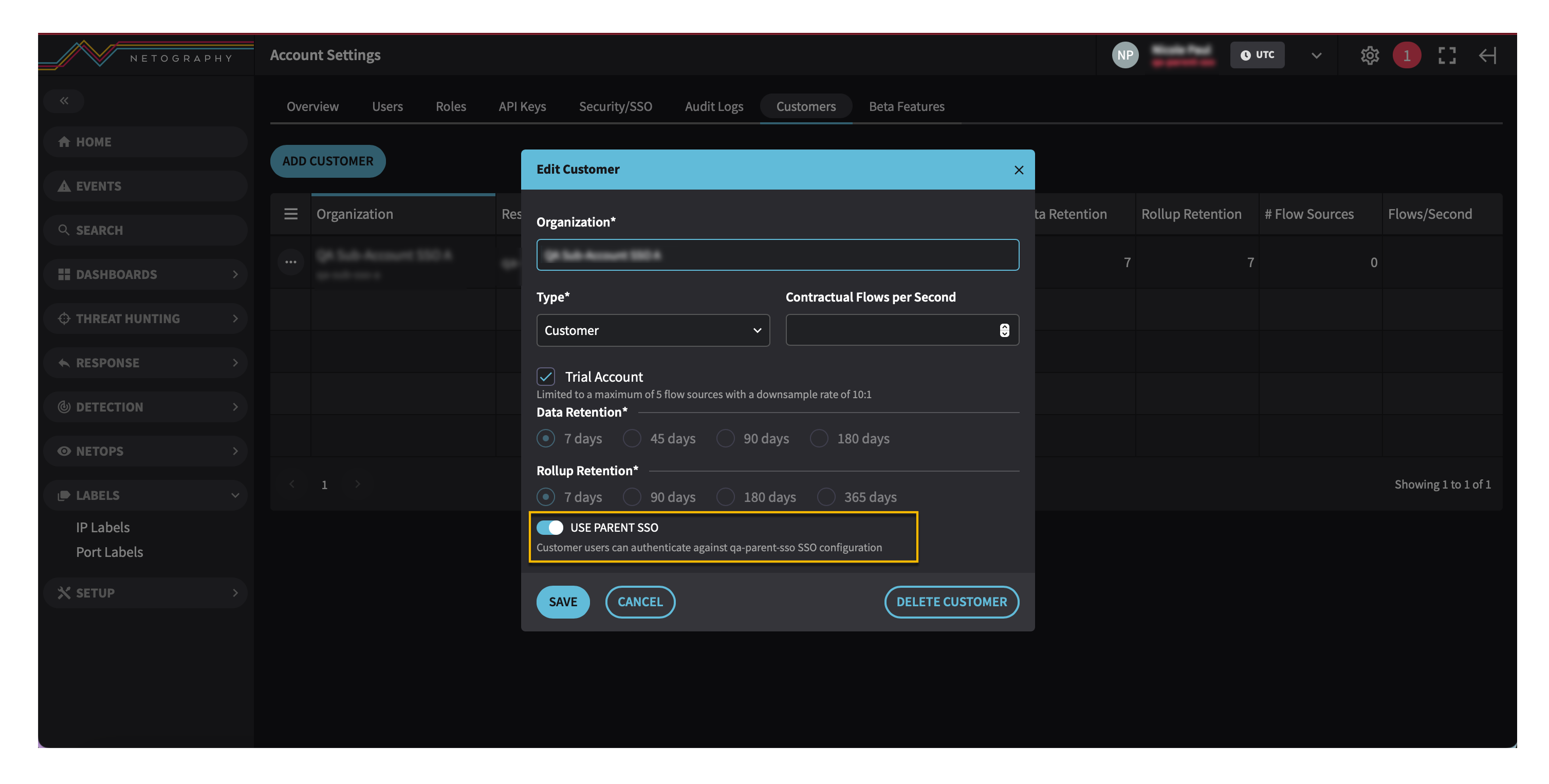
### Parent and sub-accounts can now share single sign-on (SSO) configurations.
SSO functionality is extended in this release, allowing existing sub-accounts to utilize its parent account's SSO configuration.
In the **Account Settings**, Edit Customer form, the "**Use Parent SSO**" toggle displays, allowing the use of parent SSO for sub-accounts.
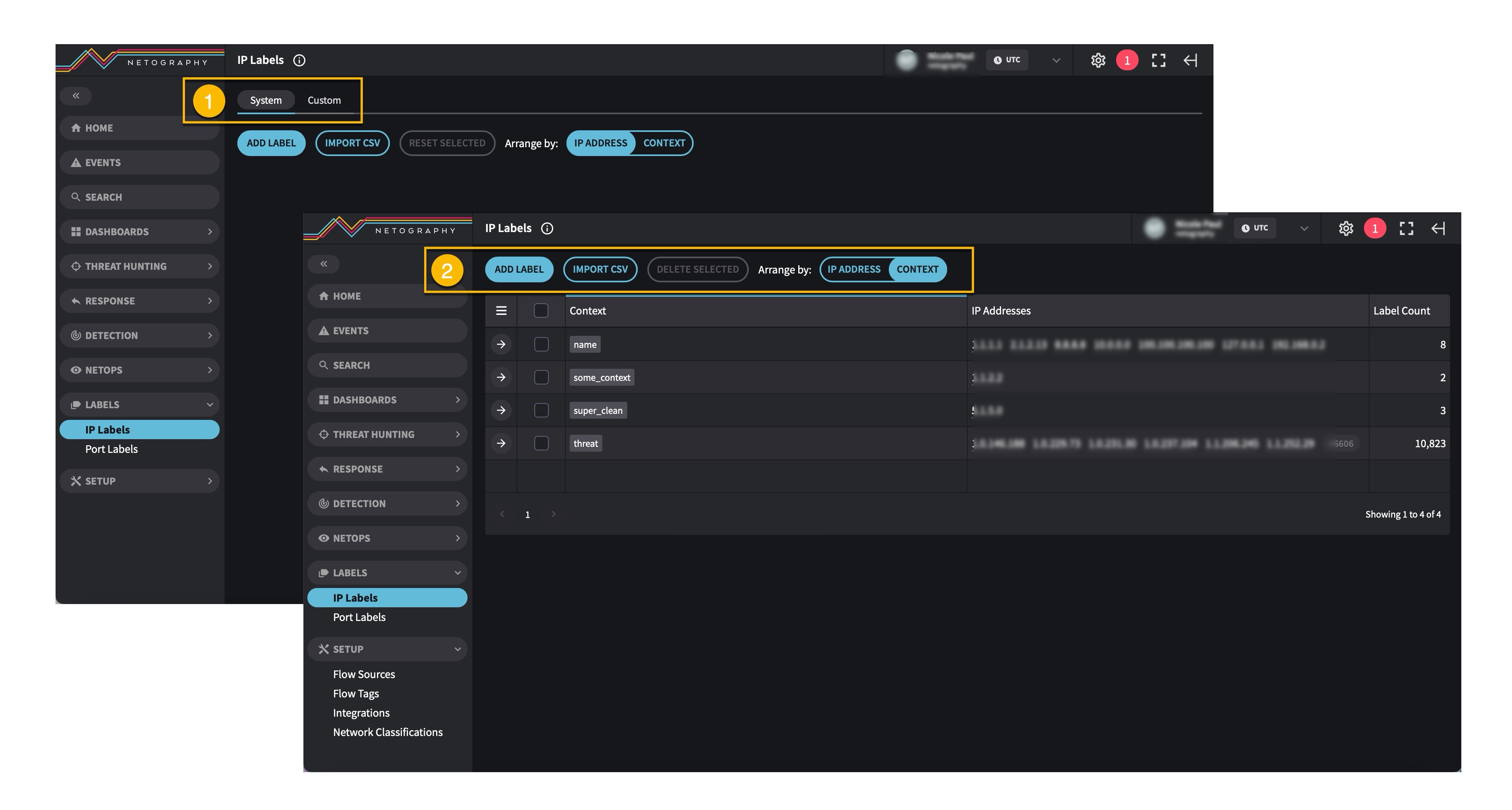
### IP Labels page change
The **IP Labels** page has changed. Previous to this version, the **IP Labels** page displayed **System** and **Custom** tabs :solid: In this latest version, the **System** and **Custom** tabs are removed :solid: and only custom labels display in the table. Additionally, the Expand Properties Tray controller has been removed from the custom page.
### New dashboard options
Previous to this version, dashboards opened in **Edit** mode. This is now changed. There are now two modes: **Edit** mode, which allows you to modify the dashboard and its settings, and an **Open** (view only) mode.
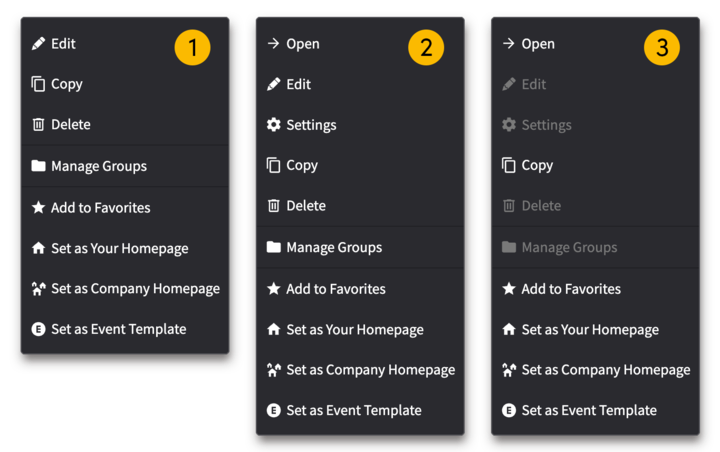
On the **Manage Dashboard** page, an ellipse :solid: button displays for each dashboard row. Clicking this button enables you to select options related to its dashboard.
1. Image :solid: displays the previous version's menu options.
2. Image :solid: displays 2 additional menu options: :sharp: Open and :sharp: Settings. Including these new options ensures dashboards are not inadvertently modified.
3. Image :solid: displays the menu options greyed out because the user does not have permission to manage or modify dashboards.
When a dashboard is opened in Edit mode, the following elements appear on the page: the unlocked :solid: button, the **ADD WIDGET** button, and the **SETTINGS** button. Clicking the unlocked :solid: button changes its state to locked :solid:, editable options are removed, and the dashboard is now in view only mode.

### NetoFuse v1.1 update
The NetoFuse container image and Python package for on-prem deployment have been updated to simplify the initial setup when using the container on a Docker host, provide more flexible configuration options, and remove unnecessary commands. See [Install](https://docs.netography.com/docs/install) and [Configure](https://docs.netography.com/docs/configure) for more details.
#### New configuration format
The new NetoFuse configuration library adheres to 12-factor application best practices and allows all configurations to be set in YAML, in an environment settings file, and the environment.
This update has changed the structure of the `netofuse.yml`. The configuration file uses a new naming scheme for environment variables, so a manual migration step is required for this update.
`.netofuse.env` is now the default environment settings file. A new `--env` command line option can specify a different file path for this settings file. A new `--envfile` option for the `init` command can be used to write a template with all the possible environment variable names and values pre-populated.
#### Converting from NetoFuse v1.0.x to v1.1
Netography Support will migrate any existing v1.0.x on-prem deployments to v1.1 for you. Contact Netography Support to set up a live migration and training session on the v1.1 update.
To migrate manually, follow these steps:
1. Save a backup copy of your current `netofuse.yml` configuration (or `netofuse.conf` if you are on 1.0.7 or older).
2. Follow the [Install](https://docs.netography.com/docs/install) documentation to update the software.
3. Rename any environment variables you are using for configuration or secrets to follow the updated format documented in [Configure](https://docs.netography.com/docs/configure) (e.g. `NETO_API_APP_KEY` is now `NETO__API__CREDENTIALS__APP_KEY`).
4. Start with a new default `netofuse.yml` configuration file, and port the values of any settings you modified in the backup copy you saved into the new configuration file.
---
# Agent Instructions: Querying This Documentation
If you need additional information that is not directly available in this page, you can query the documentation dynamically by asking a question.
Perform an HTTP GET request on the current page URL with the `ask` query parameter:
```
GET https://docs.fusion.vectra.ai/release-notes/2024/january-16-2024.md?ask=
```
The question should be specific, self-contained, and written in natural language.
The response will contain a direct answer to the question and relevant excerpts and sources from the documentation.
Use this mechanism when the answer is not explicitly present in the current page, you need clarification or additional context, or you want to retrieve related documentation sections.